A professional CV is the first step toward getting your dream job. Recruiters usually spend only 5–10 seconds reviewing a resume before deciding whether to continue reading. That is why creating a clean, professional, and ATS-friendly CV is very important.
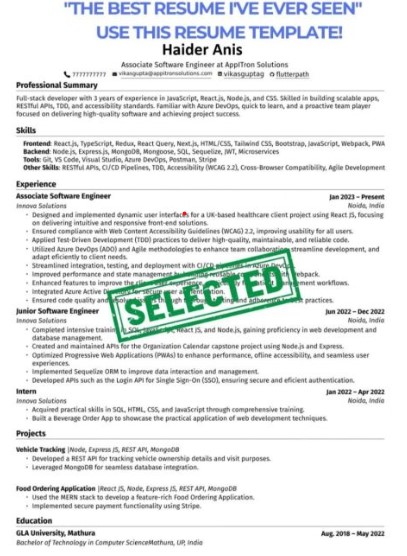
The resume template shown in the image is an excellent example of a modern and professional CV. It has a clean design, proper sections, clear headings, and highlights important information without unnecessary details. If you are applying for government jobs, private companies, software houses, banks, or multinational organizations, following this style can increase your chances of getting shortlisted.
Why Is a Good CV Important?
A CV is your personal marketing document. It tells employers who you are, what skills you have, and why you are the right candidate for the job.
A strong CV helps you:
- Get shortlisted for interviews
- Stand out from other applicants
- Show your professional skills
- Create a positive first impression
- Increase your chances of getting hired
Key Sections Every Professional CV Should Include
1. Professional Header
Start your CV with:
- Full Name
- Job Title
- Mobile Number
- Professional Email Address
- LinkedIn Profile (Optional)
- Portfolio or Website (If Available)
Avoid using unprofessional email addresses.
Example:
2. Professional Summary
Write a short summary of 3–5 lines explaining:
- Your experience
- Skills
- Career goals
- Industry expertise
Example:
Motivated and hardworking professional with excellent communication and technical skills. Experienced in problem-solving, teamwork, and project management. Passionate about learning new technologies and delivering high-quality work.
3. Skills Section
Include both technical and soft skills.
Technical Skills
- MS Office
- Excel
- Web Development
- Graphic Design
- Programming
- Digital Marketing
- Data Analysis
Soft Skills
- Communication
- Leadership
- Teamwork
- Time Management
- Problem Solving
- Critical Thinking
- Adaptability
4. Work Experience
Mention your experience in reverse chronological order.
Include:
- Job Title
- Company Name
- Employment Duration
- Responsibilities
- Achievements
Use bullet points instead of long paragraphs.
Example:
- Managed company projects successfully
- Improved workflow efficiency
- Worked with cross-functional teams
- Achieved monthly performance targets
5. Education
Mention:
- Degree Name
- Institute
- Passing Year
- Grade or CGPA
Example:
- Bachelor of Commerce (B.Com)
- BS Computer Science
- MBA
- Intermediate
- Matric
6. Certifications
Mention certifications like:
- Google Digital Marketing
- Microsoft Office
- Graphic Designing
- Web Development
- SEO
- Data Analytics
7. Projects
Fresh graduates should include projects.
Examples:
- Final Year Project
- Portfolio Website
- Mobile Application
- Research Project
- Freelancing Projects
8. Languages
Mention languages you can speak.
Example:
- English
- Urdu
- Pashto
9. References
You can simply write:
References will be provided upon request.
islamabad Capital Territory Police Jobs 2026 last date and Eligibility Criteria
Tips to Make Your CV ATS-Friendly
Many companies use ATS (Applicant Tracking Systems) to scan resumes before a recruiter reads them.
To make your CV ATS-friendly:
- Use simple formatting
- Avoid tables and unnecessary graphics
- Use professional fonts
- Include job-related keywords
- Save as PDF unless another format is requested
- Keep headings clear
- Use bullet points
- Keep the design clean
Common CV Mistakes to Avoid
Many candidates lose job opportunities because of simple mistakes.
Avoid:
- Spelling mistakes
- Grammar errors
- Fake experience
- Low-quality photo
- Long paragraphs
- Too many colors
- Unprofessional email
- Irrelevant information
- Poor formatting
- Missing contact details
Best CV Length
- Fresh Graduates: 1 Page
- Experienced Professionals: 1–2 Pages
- Senior Professionals: Maximum 2 Pages
Should You Add a Photo?
For most international companies, a photo is not required unless the employer specifically asks for one. If you include a photo, use a recent, professional headshot with a plain background.
Best Font for a Professional Resume
Recommended fonts:
- Calibri
- Arial
- Helvetica
- Cambria
- Aptos
Use font size:
- Heading: 14–16
- Body: 10–12
Keywords That Help Your Resume
Use relevant keywords based on the job description, such as:
- Project Management
- Team Leadership
- Customer Service
- Data Analysis
- Microsoft Excel
- SEO
- Digital Marketing
- Software Development
- Communication Skills
- Time Management
Final Checklist Before Sending Your CV
✔ Check spelling and grammar
✔ Update your phone number
✔ Use a professional email
✔ Save the file as PDF
✔ Keep the file name professional
Example:
Jawad_Siddiqi_CV.pdf
✔ Customize your CV for each job
✔ Keep the design simple and professional
✔ Add measurable achievements where possible
A well-written CV can significantly improve your chances of landing an interview. Focus on clear formatting, relevant skills, measurable achievements, and accurate information. Tailor your resume to each job you apply for, keep it concise, and proofread it carefully before submitting. A professional, ATS-friendly CV demonstrates your attention to detail and helps employers quickly understand why you are a strong candidate.